
STM32F407 · SHT41 I²C
STM32F407 SHT41 I2C Guide: Wiring, HAL Code and CRC
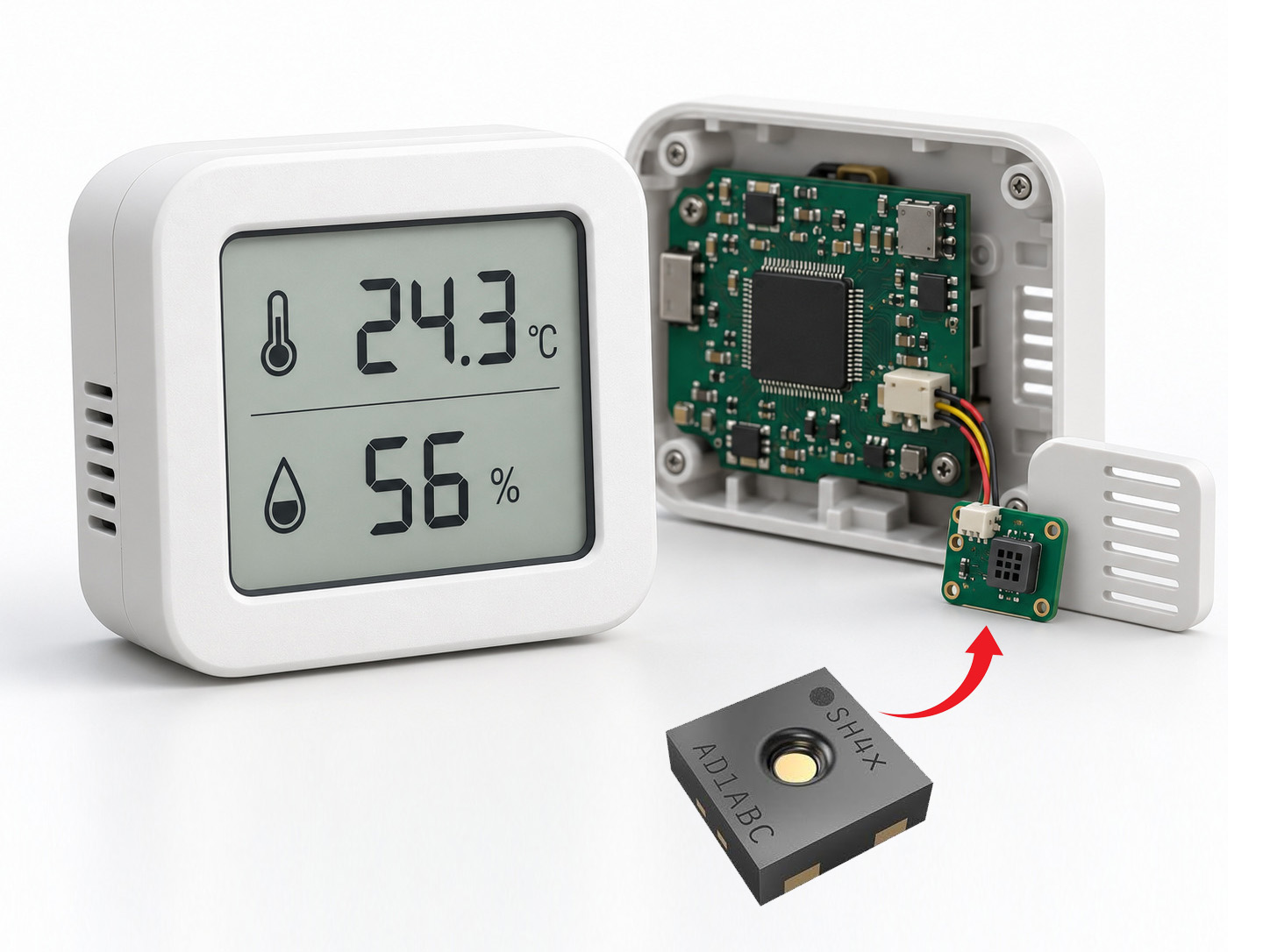
Read temperature and humidity from an SHT41 using STM32F407 I2C1. This guide connects PB6 and PB7, configures STM32CubeF4 HAL, and builds a driver that accepts a sample only after both CRC checks pass.
Start with the wiring and protocol below, or jump to the complete driver in Section 6. Sections 2–5 explain individual steps; use the complete driver when integrating the example to avoid duplicate definitions.
Quick answer
An STM32F407 reads an SHT41 in four stages: write the high-precision command 0xFD to the sensor's 7-bit address 0x44, wait about 10 ms, read six bytes, then verify the separate CRC bytes for temperature and humidity. With the STM32F4 HAL master APIs, pass the device address as (0x44 << 1).
| Item | Correct value | Common mistake |
|---|---|---|
| SHT41 7-bit address | 0x44 | Passing 0x44 directly to the STM32F4 HAL master API |
| HAL address argument | 0x44 << 1 | Manually setting the read/write bit as well |
| High-precision command | 0xFD | Treating the command as a register address |
| High-precision wait | 10 ms in this example | Reading immediately after the write |
| Response length | Six bytes | Reading only four bytes |
| CRC polynomial and initial value | 0x31 and 0xFF | Reusing CRC settings from another sensor |
1 How should the STM32F407 and SHT41 be wired
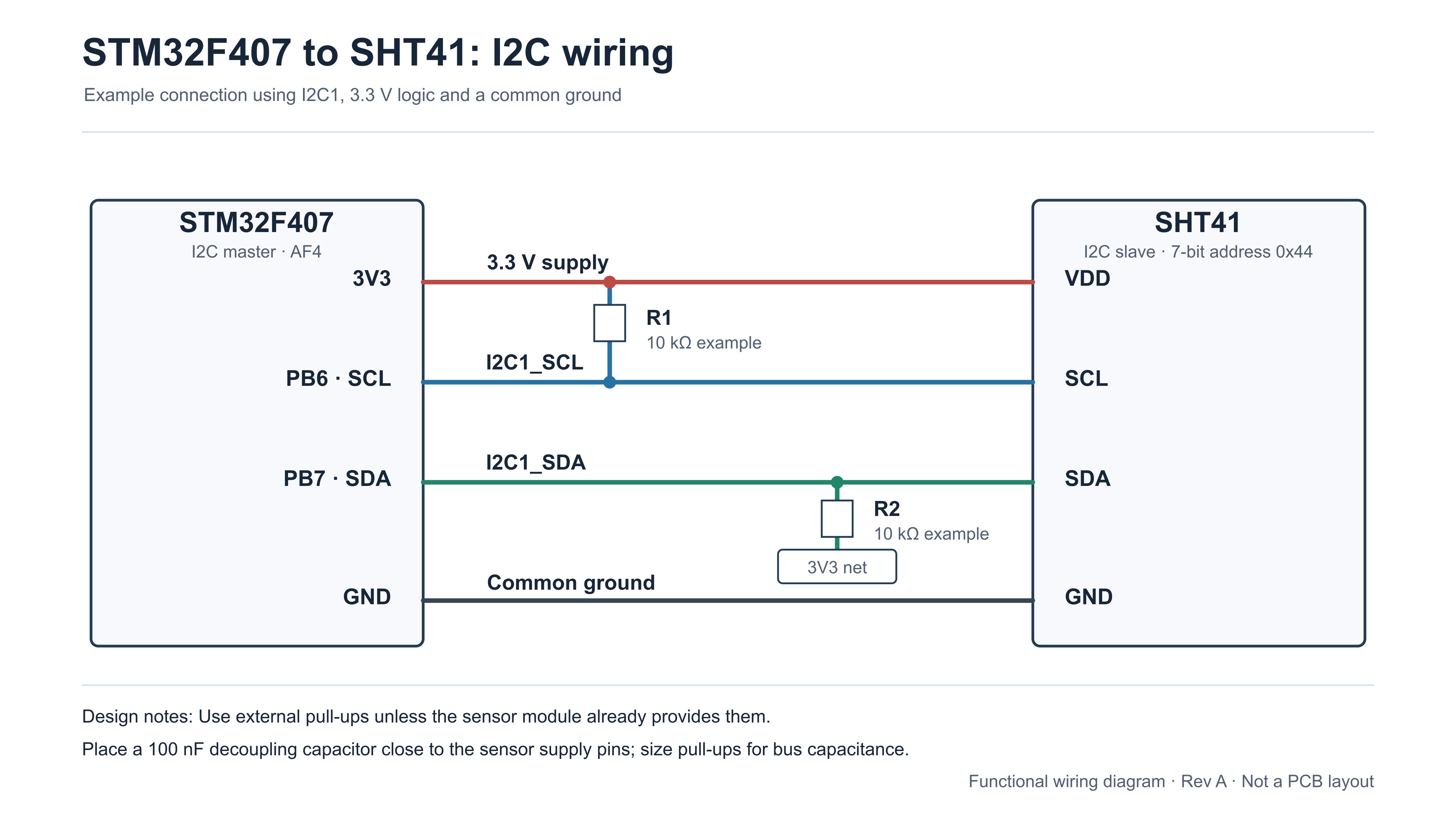
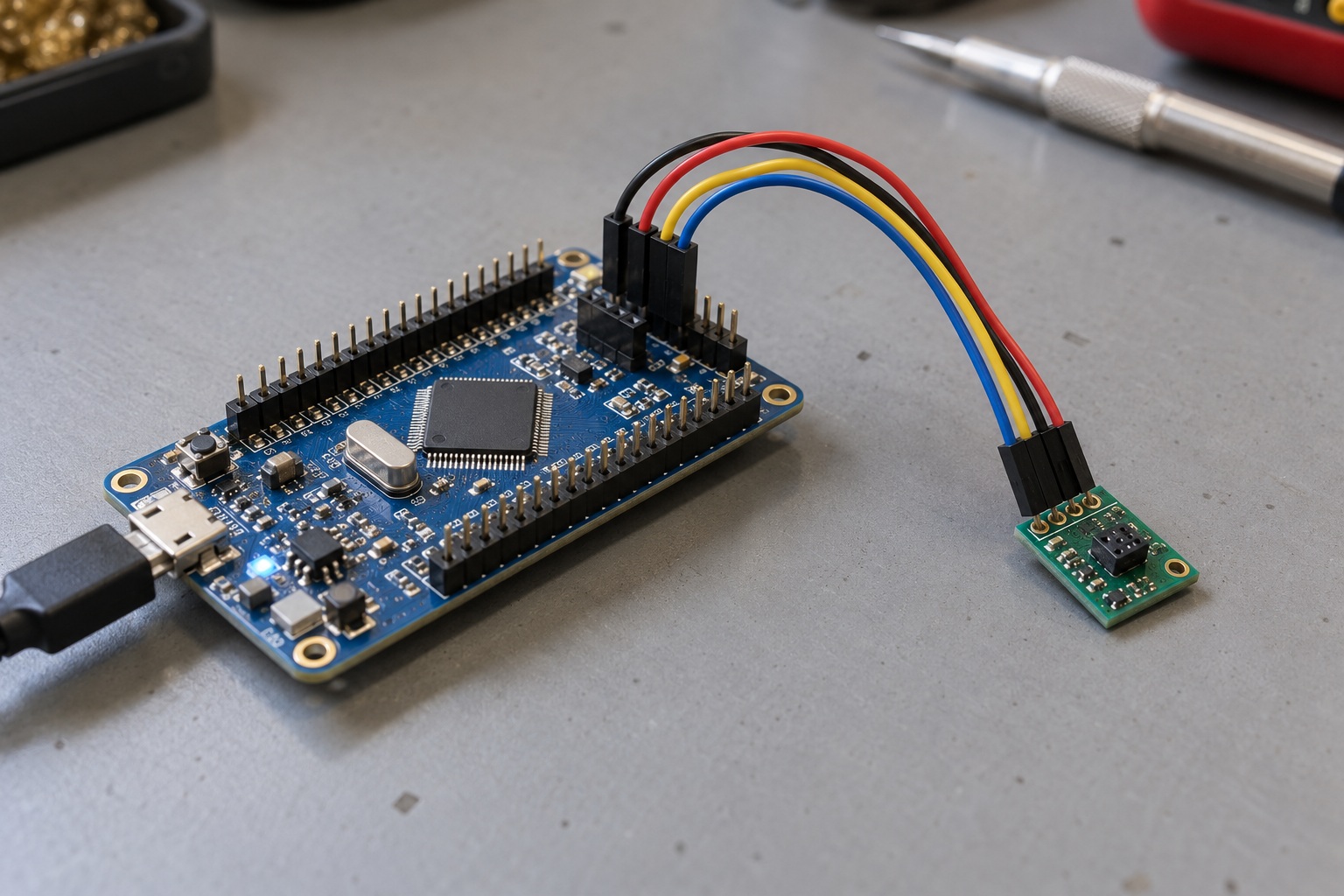
This example connects the STM32F407 I2C1 peripheral to the SHT41. SDA and SCL are open-drain lines, so each needs a pull-up to the sensor's supply rail. If you use a breakout board, check its schematic before adding resistors; the board may already include them.
| SHT41 pin | Function | STM32F407 connection | Note |
|---|---|---|---|
| SDA | I2C data | PB7 / I2C1_SDA | Pull up to the sensor supply |
| SCL | I2C clock | PB6 / I2C1_SCL | Pull up to the sensor supply |
| VDD | Supply | 3.3 V | Confirm the breakout board's supply requirements |
| GND | Ground | GND | Share ground with the microcontroller |
First bench test
- Initialize HAL, system clock, GPIO, I²C and UART.
- Trigger one SHT41 measurement each second and print the result.
- After readings are stable, add the display, controller or data logger.
This isolates sensor faults before application logic is added.
2 How should STM32F407 I2C1 be configured
Start at 100 kHz to simplify debugging. In master mode, the MCU's own address has no practical role here and can remain zero. Select 7-bit addressing and disable dual addressing and general call. The following initialization follows the common STM32CubeF4 HAL project structure.
I2C_HandleTypeDef hi2c1;

static void MX_I2C1_Init(void)
{
    hi2c1.Instance = I2C1;
    hi2c1.Init.ClockSpeed = 100000;
    hi2c1.Init.DutyCycle = I2C_DUTYCYCLE_2;
    hi2c1.Init.OwnAddress1 = 0;
    hi2c1.Init.AddressingMode = I2C_ADDRESSINGMODE_7BIT;
    hi2c1.Init.DualAddressMode = I2C_DUALADDRESS_DISABLE;
    hi2c1.Init.OwnAddress2 = 0;
    hi2c1.Init.GeneralCallMode = I2C_GENERALCALL_DISABLE;
    hi2c1.Init.NoStretchMode = I2C_NOSTRETCH_DISABLE;

    if (HAL_I2C_Init(&hi2c1) != HAL_OK) {
        Error_Handler();
    }
}
CubeMX normally generates the GPIO alternate-function setup in HAL_I2C_MspInit(). Configure PB6 and PB7 as alternate-function open-drain pins with GPIO_AF4_I2C1. The code below shows a common mapping; if your board routes I2C1 to other pins, follow its schematic and CubeMX configuration.
void HAL_I2C_MspInit(I2C_HandleTypeDef *hi2c)
{
    GPIO_InitTypeDef GPIO_InitStruct = {0};

    if (hi2c->Instance == I2C1) {
        __HAL_RCC_GPIOB_CLK_ENABLE();
        __HAL_RCC_I2C1_CLK_ENABLE();

        GPIO_InitStruct.Pin = GPIO_PIN_6 | GPIO_PIN_7;
        GPIO_InitStruct.Mode = GPIO_MODE_AF_OD;
        GPIO_InitStruct.Pull = GPIO_PULLUP;
        GPIO_InitStruct.Speed = GPIO_SPEED_FREQ_VERY_HIGH;
        GPIO_InitStruct.Alternate = GPIO_AF4_I2C1;
        HAL_GPIO_Init(GPIOB, &GPIO_InitStruct);
    }
}
Before increasing bus speed
- Pull-ups: Internal MCU pull-ups do not replace external resistors sized for the actual supply, bus capacitance and any pull-ups already on the module.
- Rising edges: Longer wiring and higher capacitance slow the bus; choose resistor values for the wiring and target clock rate.
- NoStretchMode: This configures STM32 slave-mode behavior. It does not set the SHT41 conversion delay in this master-mode example.
3 What are the SHT41 commands and measurement sequence
The SHT41 does not use a conventional register address for these operations. The host writes a one-byte command, waits for the operation, and then reads the result. The relevant commands are:
| Command | Operation | Maximum time in datasheet | Response |
|---|---|---|---|
| 0xFD | High-precision measurement | About 8.3 ms | Six bytes |
| 0xF6 | Medium-precision measurement | About 4.5 ms | Six bytes |
| 0xE0 | Low-precision measurement | About 1.6 ms | Six bytes |
| 0x89 | Read serial number | Not applicable | Six bytes |
| 0x94 | Soft reset | Up to 1 ms | No data bytes |
A high-precision measurement has five steps:
- Send command: Write
0xFDto 7-bit address0x44. - Wait: Allow 10 ms for this blocking high-precision example.
- Read: Request
T_MSB, T_LSB, T_CRC, RH_MSB, RH_LSB, RH_CRC. - Validate: Check the CRC after each two-byte measurement word.
- Convert: Calculate °C and %RH only after both CRC checks pass.
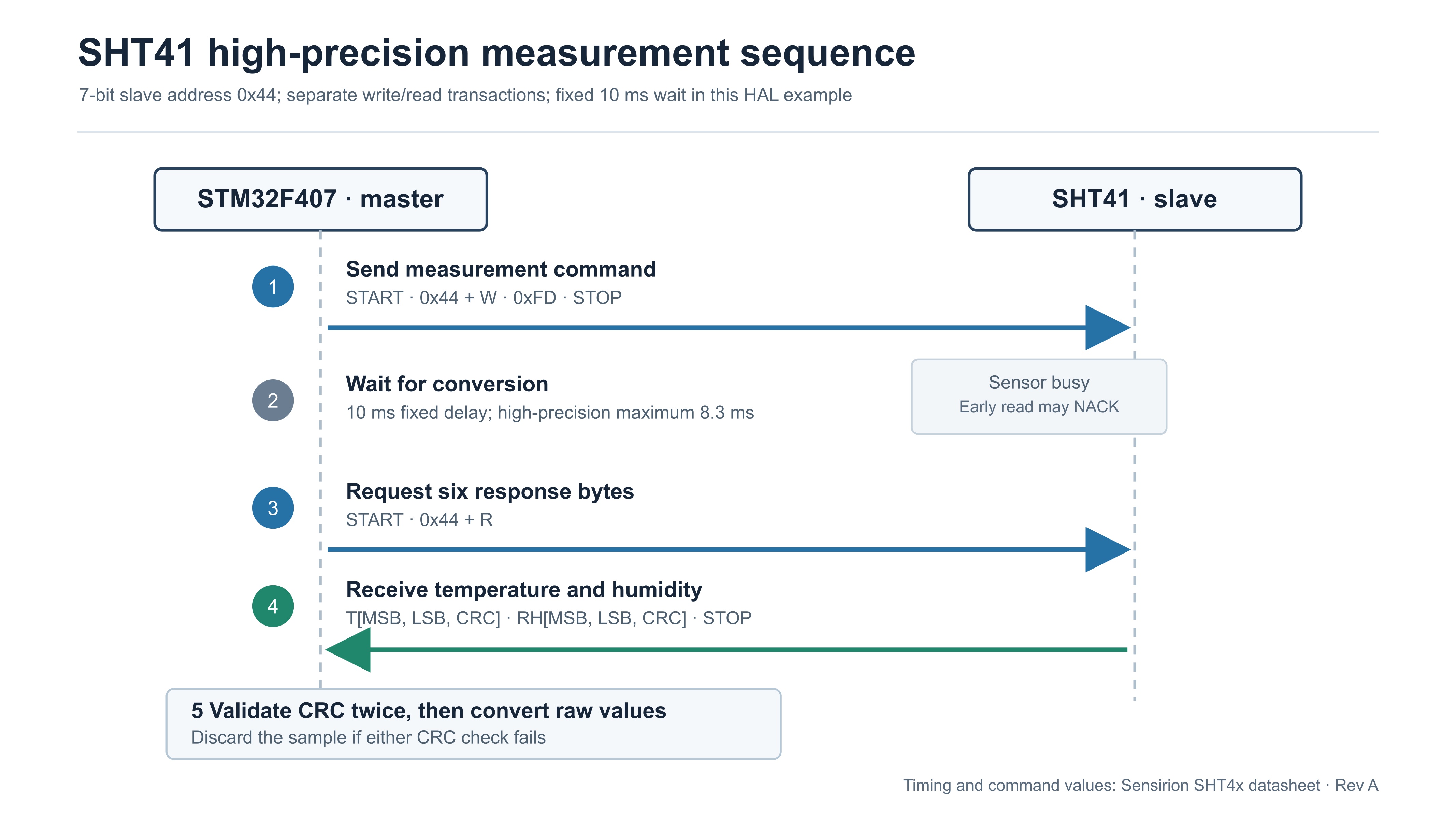
If the host requests data before conversion finishes, the SHT41 may NACK the read header. That can look like an address problem. First confirm that the command write succeeded, then check the delay before the read.
Measurement data can be received only once. The sensor deletes it after the first acknowledged I2C read header, so a bus error during that read calls for a new measurement command rather than repeated attempts to fetch the old result. A design that needs less fixed waiting can retry when a busy sensor NACKs. This example uses 10 ms to cover the 8.3 ms high-precision maximum with a little margin.
4 How is the SHT41 CRC 8 calculated
The SHT41 appends a CRC byte after each two-byte measurement value. Temperature and humidity have independent checksums. Use the sample only after both checks pass.
| CRC parameter | Value |
|---|---|
| Name | CRC-8 |
| Polynomial | 0x31, representing x^8 + x^5 + x^4 + 1 |
| Initial value | 0xFF |
| Reflected input / output | false / false |
| Final XOR | 0x00 |
| Check example | CRC(0xBE, 0xEF) = 0x92 |
For each data byte, XOR it into the current CRC and process eight bits from the most significant bit. If the top bit is set, shift left and XOR with 0x31; otherwise just shift left. This implementation uses an 8-bit accumulator, so every assignment retains only the low eight bits.
static uint8_t SHT41_CalcCRC8(const uint8_t *data, uint8_t len)
{
    uint8_t crc = 0xFF;

    for (uint8_t i = 0; i < len; ++i) {
        crc ^= data[i];
        for (uint8_t bit = 0; bit < 8; ++bit) {
            crc = (crc & 0x80U)
                ? (uint8_t)((crc << 1) ^ 0x31U)
                : (uint8_t)(crc << 1);
        }
    }
    return crc;
}
5 How are raw SHT41 readings converted
The six response bytes appear in this order:
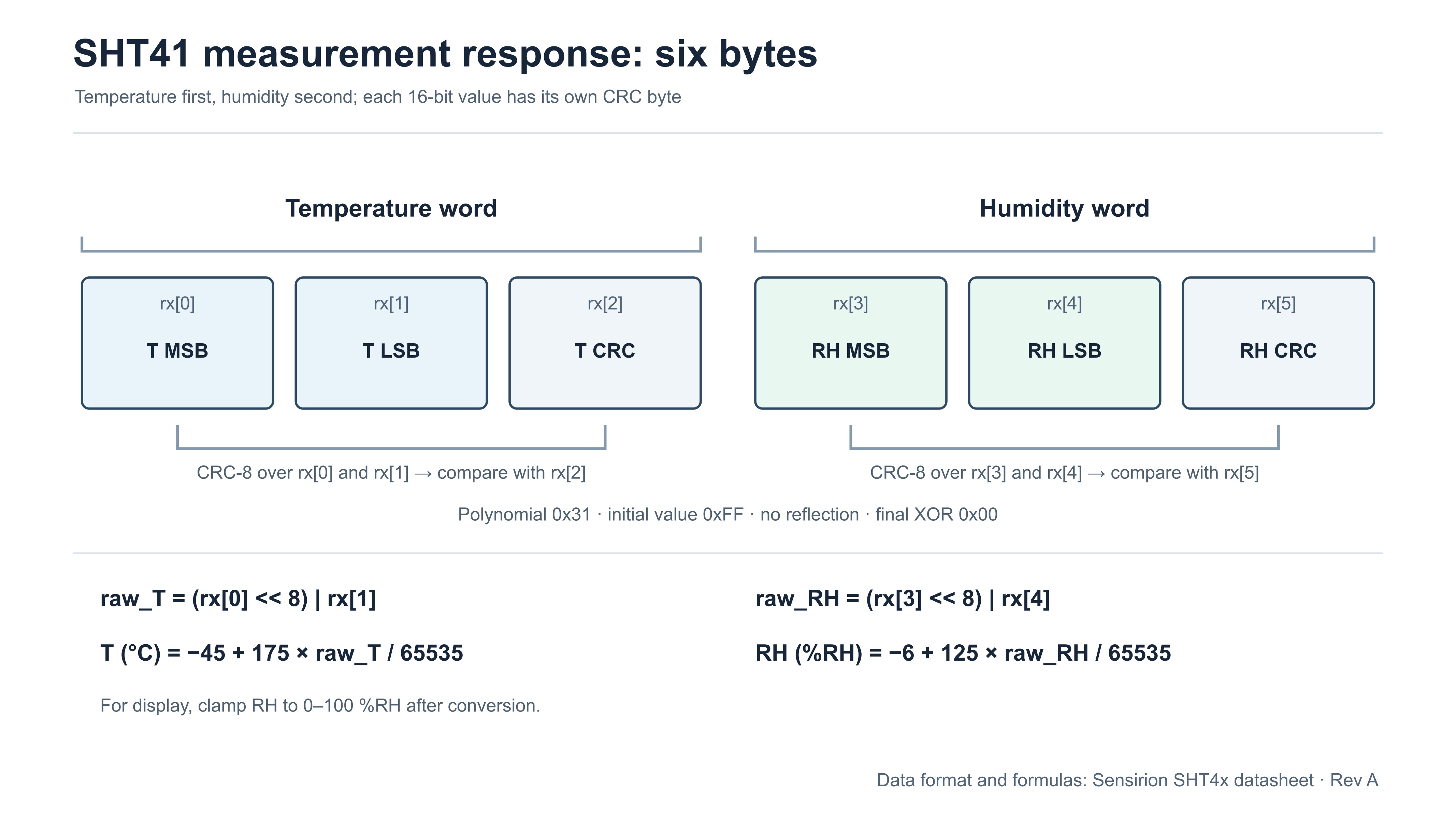
rx[0]  Temperature raw value, most significant byte
rx[1]  Temperature raw value, least significant byte
rx[2]  Temperature CRC
rx[3]  Humidity raw value, most significant byte
rx[4]  Humidity raw value, least significant byte
rx[5]  Humidity CRC
The sensor sends the most significant byte first, so assemble each unsigned 16-bit value in big-endian order:
uint16_t raw_t  = ((uint16_t)rx[0] << 8) | rx[1];
uint16_t raw_rh = ((uint16_t)rx[3] << 8) | rx[4];
Apply the datasheet's linear conversion formulas:
float temperature_c = -45.0f + 175.0f * (float)raw_t / 65535.0f;
float humidity_rh   =  -6.0f + 125.0f * (float)raw_rh / 65535.0f;
For user-facing relative humidity, clamp the result to the physical range of 0 to 100 %RH:
if (humidity_rh > 100.0f) humidity_rh = 100.0f;
if (humidity_rh <   0.0f) humidity_rh =   0.0f;
The datasheet formulas divide by 65535.0f, or 2^16 - 1. Sensirion also permits division by 65536.0f as a computational simplification; it introduces deviations below 0.002 %RH and 0.003 °C. This tutorial retains the original denominator. Floating-point constants prevent integer-division truncation. Clamping is useful for display, while an analysis of boundary behavior may need the unmodified value.
6 How can the SHT41 driver be packaged for reuse
The following driver puts the address, commands, CRC, and measurement flow in one place. SHT41_Read() returns true only when both the bus transaction and CRC checks succeed. The caller should use the output values only after a successful return.
#include "stm32f4xx_hal.h"
#include <stdbool.h>
#include <stddef.h>
#include <stdint.h>

#define SHT41_ADDR_7BIT          0x44U
#define SHT41_ADDR_HAL           (SHT41_ADDR_7BIT << 1)
#define SHT41_CMD_MEASURE_HIGH   0xFDU
#define SHT41_CMD_SOFT_RESET     0x94U
#define SHT41_I2C_TIMEOUT_MS     100U

extern I2C_HandleTypeDef hi2c1;

static uint8_t SHT41_CalcCRC8(const uint8_t *data, uint8_t len)
{
    uint8_t crc = 0xFF;

    for (uint8_t i = 0; i < len; ++i) {
        crc ^= data[i];
        for (uint8_t bit = 0; bit < 8; ++bit) {
            crc = (crc & 0x80U)
                ? (uint8_t)((crc << 1) ^ 0x31U)
                : (uint8_t)(crc << 1);
        }
    }
    return crc;
}

HAL_StatusTypeDef SHT41_SoftReset(void)
{
    uint8_t cmd = SHT41_CMD_SOFT_RESET;
    HAL_StatusTypeDef status = HAL_I2C_Master_Transmit(
        &hi2c1, SHT41_ADDR_HAL, &cmd, 1, SHT41_I2C_TIMEOUT_MS);

    if (status == HAL_OK) {
        HAL_Delay(2); /* Allow margin beyond the 1 ms soft-reset maximum. */
    }
    return status;
}

bool SHT41_Read(float *temperature_c, float *humidity_rh)
{
    uint8_t cmd = SHT41_CMD_MEASURE_HIGH;
    uint8_t rx[6];

    if ((temperature_c == NULL) || (humidity_rh == NULL)) {
        return false;
    }

    if (HAL_I2C_Master_Transmit(&hi2c1, SHT41_ADDR_HAL,
                                &cmd, 1, SHT41_I2C_TIMEOUT_MS) != HAL_OK) {
        return false;
    }

    HAL_Delay(10);

    if (HAL_I2C_Master_Receive(&hi2c1, SHT41_ADDR_HAL,
                               rx, sizeof(rx), SHT41_I2C_TIMEOUT_MS) != HAL_OK) {
        return false;
    }

    if ((SHT41_CalcCRC8(&rx[0], 2) != rx[2]) ||
        (SHT41_CalcCRC8(&rx[3], 2) != rx[5])) {
        return false;
    }

    uint16_t raw_t  = ((uint16_t)rx[0] << 8) | rx[1];
    uint16_t raw_rh = ((uint16_t)rx[3] << 8) | rx[4];

    *temperature_c = -45.0f + 175.0f * (float)raw_t / 65535.0f;
    *humidity_rh   =  -6.0f + 125.0f * (float)raw_rh / 65535.0f;

    if (*humidity_rh > 100.0f) *humidity_rh = 100.0f;
    if (*humidity_rh <   0.0f) *humidity_rh =   0.0f;

    return true;
}
7 How do you read the SHT41 in the main loop
During validation, trigger one read per second and print it over UART. In a product, use a scheduler or timer to avoid long main-loop blocking. This main() shows the call site. In a single main.c, place the Section 6 driver above main(); if you split it into .c and .h files, declare both driver APIs in the header. CubeMX clock, GPIO, and I2C initialization must exist. UART setup and printf redirection are project-specific.
#include <stdio.h>

int main(void)
{
    float temperature = 0.0f;
    float humidity = 0.0f;

    HAL_Init();
    SystemClock_Config();
    MX_GPIO_Init();
    MX_I2C1_Init();
    /* Initialize the project's UART and redirect printf here. */

    if (HAL_I2C_IsDeviceReady(&hi2c1, SHT41_ADDR_HAL,
                              3, SHT41_I2C_TIMEOUT_MS) != HAL_OK) {
        printf("SHT41 not found\r\n");
    }

    for (;;) {
        if (SHT41_Read(&temperature, &humidity)) {
            printf("Temperature: %.2f C, Humidity: %.2f %%RH\r\n",
                   temperature, humidity);
        } else {
            printf("SHT41 read failed\r\n");
        }
        HAL_Delay(1000);
    }
}
8 How should an SHT41 read failure be diagnosed
- Wrong address format. 0x44 is a 7-bit address; pass (0x44 << 1) to the STM32F4 HAL master API.
- Insufficient conversion time. A high-precision 0xFD measurement can take up to about 8.3 ms; this example waits 10 ms.
- Incomplete read. Read all six bytes and verify both CRCs. The datasheet permits stopping after a 16-bit word, but this omits checksum protection.
- Wrong CRC settings. Use polynomial 0x31 and initial value 0xFF, not settings copied from another sensor.
- Unclear humidity-range handling. Clamp display values to 0–100 %RH; keep unclamped values when studying range boundaries.
- Treating the SHT41 as a register device. 0xFD is a one-byte command, not a register address for HAL_I2C_Mem_Read(). Use master transmit and receive.
- Ignoring pull-ups or supply. SDA and SCL need appropriate external pull-ups. Check whether the module already provides them.
Troubleshoot in this order: device ACK, command write, conversion wait, response length, and CRC. It moves from the bus layer to the data layer, avoiding premature work on conversion formulas or serial-output formatting.
| Symptom | Check first | Evidence to look for |
|---|---|---|
| HAL_I2C_IsDeviceReady() fails | Shifted address, wiring, supply, pull-ups | Address and ACK on the bus |
| Command succeeds but read NACKs | Measurement delay | Read succeeds after waiting 10 ms |
| Read succeeds but CRC fails | Byte order, length, CRC settings | Each two-byte word has its own CRC |
| Temperature looks right, humidity does not | Humidity indexes and conversion | Humidity comes from rx[3] and rx[4] |
| Values never change | Repeated measurement trigger | Send 0xFD before every new sample |
9 What should be checked before porting the example
- Confirm that your board actually uses PB6 and PB7 rather than other I2C1 alternate-function pins.
- Confirm the module supply voltage and whether SDA and SCL pull-ups are already fitted.
- Replace the UART instance, system clock setup, and printf redirection with the versions used by your project.
10 Frequently asked questions
Can the SHT41 CRC check be omitted
The protocol permits a master to stop reading before a CRC when it does not need verification. This driver reads all six bytes and checks both CRCs. That keeps corrupted transfers out of control and logging paths and helps distinguish bus faults from conversion mistakes.
Why can calculated humidity exceed 100 percent RH
Near the measurement-range boundaries, the SHT41 conversion formula can produce a value slightly below 0 or above 100 %RH. Clamp values shown to users; retain the unclamped result if you are studying boundary distributions. Such a value alone does not prove that the sensor is damaged.
Why are floating-point values missing from UART output
First confirm that printf is redirected to the intended UART. Some small embedded C libraries do not enable floating-point formatting by default, so %.2f may not print as expected. Enable float formatting for your toolchain or scale the value and print an integer. This symptom is separate from the SHT41 I2C transaction.
11 From a failed read to stable sampling
Return to the opening failure: test the address and wiring with HAL_I2C_IsDeviceReady(), confirm 0xFD and the conversion delay, then verify byte order and both CRCs. These checks isolate bus, timing, and parsing faults.
This small driver can validate a bare-metal project before being adapted to a nonblocking state machine or RTOS task. The address format, timing, response layout, and CRC parameters remain the same.
12 Technical references
Sensirion SHT4x datasheet covers timing, response format, CRC, and conversion; ST STM32F407 datasheet covers pin mapping; ST STM32F4 HAL I2C driver covers the master APIs.
From a working driver to a reliable sensor assembly
Before integrating the STM32F407 driver into your application, confirm the board pin mapping, supply and pull-up rails, conversion delay, and both CRC checks. Then verify repeated sampling and error recovery with the final wiring, power supply and enclosure.
Comparing sensors for a new design? Include NYFEA FHT41 as a candidate in your selection review. Compare its electrical limits, I²C commands, CRC behavior, accuracy across your operating range, power consumption, package and pinout with the SHT41 requirements. Validate the selected device on your STM32F407 board before reusing the driver or approving the assembly.